


CNN
3.2175.00 Reviews
App Specs
- Version
- 26.7.1
- Updated On
- License
- Free
- Downloads
- 500,000+
- Developer
- CNN
- Categories
- News & Magazines
- Platform
- Android
Screenshots
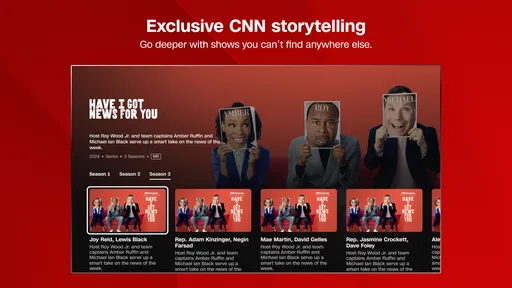
 Analysis by AppCompare
I’d treat CNN as a useful way to keep up with a major news outlet, not as a complete replacement for every source I use. Its mix of written coverage and live channels makes it handy when a story is unfolding, while the alerts and saved articles help fit news into a busy day. The trade-off is that a single outlet naturally gives you a particular editorial lens, and the app may feel too busy if you want a quiet, tightly controlled reading list.
A practical way to follow a developing story
For a realistic routine, I’d check the headlines over breakfast, save one or two longer reports for later, then open a live broadcast if a major event is still developing. That sequence uses the app in distinct ways: a quick scan for orientation, a saved article for context, and video when seeing a presenter explain events is more useful than reading another headline. I wouldn’t keep the live stream running all day; it is more valuable when I have a specific reason to watch.
The app is free to install, though it offers in-app purchases, so I’d check what a purchase covers before committing. The age rating is Everyone 10+, a useful detail for households deciding whether it suits younger readers. CNN is the developer, and the app sits in the news and magazines category. Its current version is 4.2.0, with Android 8.0 as the minimum OS requirement.
Where a single-outlet app helps—and where it doesn’t
Compared with an aggregator that pulls headlines from many publishers, CNN gives me a more coherent route into its own reporting and broadcasts. That consistency can make it easier to follow a story within one newsroom’s coverage, but it is not the same as comparing several editorial approaches. When a topic matters to me, I’d use CNN to get an initial account and then read another reputable outlet for a different emphasis or additional context.
It also differs from a general web browser: the app is built around CNN’s news experience rather than the whole internet. That focus is convenient when I already want CNN, but less useful if I prefer to choose from a broad mix of local, specialist, and international publications in one place. For a person who wants one familiar source and live television access, the focused approach is a strength; for someone building a balanced reading list, it is only one part of the routine.
Small habits that make the experience more useful
I’d be selective with alerts from the start. Breaking news can be important, but repeated updates on a story I’m not following can interrupt work without adding much understanding. Choosing only the subjects I genuinely want to track makes notifications more purposeful. When an alert does arrive, I’d open the full report rather than relying on its short lock-screen wording; a notification is a prompt, not enough context to judge a complicated event.
Saving an article is most useful when I treat it as a reading queue rather than a permanent archive. I can bookmark a piece while commuting or between tasks, then return when I have enough attention to finish it. If the queue grows without limit, though, it becomes another inbox to manage. A quick habit of revisiting saved stories and clearing the ones I no longer need keeps the feature practical.
Worth Reading Before You Choose

EA SPORTS FC Mobile 26 Is a Bigger Football Game, but It Takes Time

Flipboard Shows What News Apps Must Do Beyond the Feed

Switching to Android Auto Means Rethinking Your Driving Routine

Google Calendar Makes a Crowded Week Easier to Manage

Ludo King Makes the Most of the Minutes Between Plans

Baby Panda World Brings Quick Play to Modern Phones, but Its Game Library Feels Busy
Personalized recommendations can also be a convenient starting point, but I wouldn’t let them define the whole news diet. They may help surface subjects I tend to read, yet regularly checking the broader headlines is a simple way to avoid seeing only familiar topics. This matters especially when a breaking story connects to an area I don’t usually follow.
Who should choose it
I’d recommend CNN to readers who want a familiar newsroom in their pocket, like having video alongside articles, and are comfortable receiving a curated view from one publisher. It can suit someone who checks headlines in short gaps during the day, as well as a viewer who wants to switch from reading to a live channel when an event warrants it. With more than 500,000 installs and an average rating of 2.8 from 446 ratings, it has a sizable audience but mixed feedback; I’d take that rating as a reason to approach it with realistic expectations rather than assume the experience will suit everyone.
I’d skip it if I want a strictly neutral, multi-source feed, dislike breaking-news interruptions, or mostly read local reporting that a national outlet may not prioritize. A news aggregator may be a better fit for comparing publishers in one stream, while a newspaper’s own app may work better for readers who want deeper coverage of a particular city or subject. CNN is also not the right choice if I rarely watch news video and don’t want another source of alerts; its strongest appeal is the combination of reporting and broadcast access.
Ever found yourself lost in the never-ending cycle of news updates and information madness? I know I have. That's where the CNN app comes into play. It's like having a personal news assistant tucked away in your pocket, keeping you informed about the world without overwhelming you. So, let's dive into what makes this app a must-have for news junkies and casual readers alike.
First Impressions and Usability
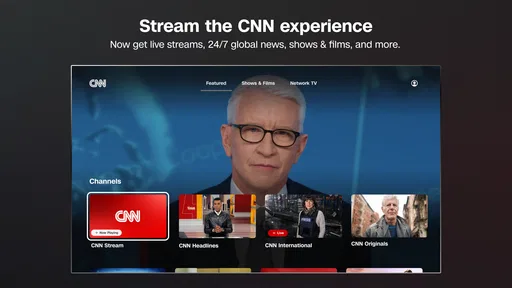
When you first open the CNN app, you're greeted with a clean and sleek design. It’s refreshing, really. The user interface is intuitive, making it easy for anyone to navigate, whether you're a tech whiz or someone who just learned how to use a smartphone yesterday. The main screen is organized with top stories, live TV, and a section for personalized content based on your preferences.
One thing that stands out is the app's speed. You tap, and boom, the news pops up. No annoying lag time here, folks. It's like the app knows you don’t have time to spare. I found myself quickly browsing through headlines and catching up on the day’s events without any hassle.
Content and Features
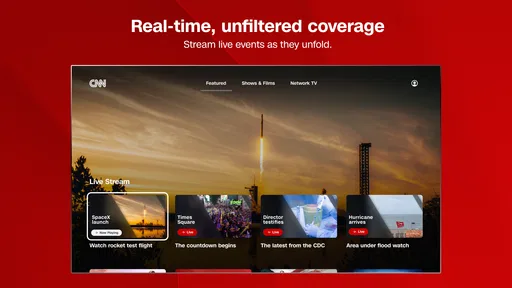
The app offers a rich variety of content, from breaking news and in-depth articles to opinion pieces and video clips. You’ve got everything you need to stay informed. The live TV feature is a game-changer, allowing you to watch CNN broadcasts in real-time. Perfect for those moments when you need to see the action as it unfolds.
Let’s talk about the personalized news feed. It’s like the app reads your mind. It curates articles that align with your interests, ensuring that you’re not bombarded with irrelevant information. I personally enjoyed having a tailored experience, making my daily news consumption efficient and enjoyable.
"With the CNN app, every piece of news feels like it was picked just for me."
Interactive Elements
Now, I'm a sucker for interactive content, and CNN doesn’t disappoint. The app includes features like polls and quizzes that engage you beyond just reading. It’s a clever way to make the news more interactive and less monotonous.
Another cool feature is the option to save articles for later. Sometimes, you just don’t have the time to read a lengthy piece, and this feature ensures you won’t miss out. You can easily bookmark and revisit the content at your convenience.
Notifications and Alerts
Notifications can be a double-edged sword. Too many, and they become annoying; too few, and you miss out on important updates. CNN strikes the right balance. You can customize alerts based on categories like world news, politics, or sports, ensuring you only get notified about what truly matters to you.
The breaking news alerts are particularly useful. They pop up right on your lock screen, making sure you’re always in the loop. It's like having a news ticker running in the background of your day-to-day life.
Overall Experience
In the grand scheme of apps, CNN stands out for its reliability and user-friendly design. It’s a powerhouse of information, neatly packaged into an app that respects your time and attention. Whether you’re a news enthusiast or just someone trying to keep up with the world, this app is a perfect companion.
In conclusion, if you’re looking for a comprehensive news app that delivers timely and relevant content without the clutter, the CNN app is your go-to. It’s like having a personal news desk in your pocket, ready to deliver the world’s happenings with just a tap. So go ahead, download it, and let the news unfold at your fingertips.
Pros
- High-quality news coverage.
- User-friendly interface.
- Regular content updates.
- Wide range of topics.
- Customizable notifications.
Cons
- Frequent ads can be intrusive.
- Requires internet connection.
- Occasional app crashes.
- Limited offline access.
- Some content is region-locked.
FAQs for CNN
What features does the CNN app offer to enhance my news consumption experience?
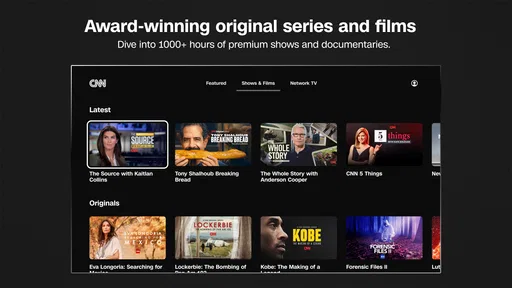
The CNN app provides a variety of features designed to enhance your news consumption. It includes live streaming of CNN TV, personalized news feeds, alerts for breaking news, and access to podcasts and original series. Additionally, the app offers an interactive map for global news and the ability to save articles for offline reading.
Is the CNN app free to use, or are there any subscription requirements?
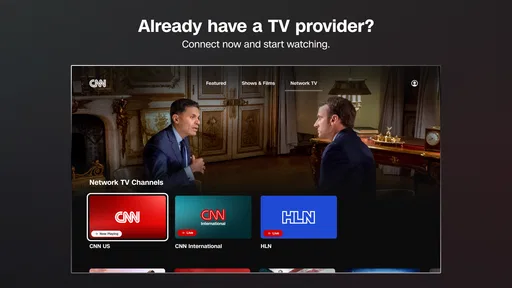
The CNN app is free to download and provides access to a wide range of news articles and videos. However, some premium content, such as live TV streaming, may require a cable or satellite subscription. In-app purchases or subscriptions might also be available to enhance the user experience.
How does the CNN app ensure the accuracy and reliability of its news content?
CNN maintains a strong reputation for journalistic integrity and accuracy. The app's content is produced by professional journalists and is subject to rigorous editorial standards. CNN also provides real-time updates and corrections to ensure users receive the most accurate and reliable information available.
Can I customize the type of news I receive on the CNN app?
Yes, the CNN app allows users to customize their news feed according to their interests. You can select topics or regions you want to follow, and the app will prioritize these in your feed. Additionally, you can enable notifications for specific categories or breaking news alerts.
What devices and operating systems are compatible with the CNN app?
The CNN app is available for both Android and iOS devices. It supports a wide range of smartphones and tablets. To ensure optimal performance, users should have the latest version of the app installed, which can be downloaded from the Google Play Store or the Apple App Store.


